Last Updated: April 2026 | The most comprehensive PLC programming guide for beginners, students, technicians, and engineers entering industrial automation.
This PLC programming guide is the complete free manual for learning PLC programming from scratch. Whether you are a beginner with zero electrical background, a technician looking to advance your career, or an engineering student preparing for industrial automation jobs — this PLC programming guide gives you the structured roadmap, practical examples, and complete reference used by thousands of automation professionals worldwide.
PLC programming is the foundation of modern industrial automation. From simple motor control systems to complex manufacturing plants, PLCs run the machines, processes, and production lines that power our economy. The good news — anyone with basic electrical knowledge and the right learning approach can master PLC programming. This guide shows you exactly how.
In this PLC programming guide you will learn:
- What PLC programming is and why it powers global manufacturing
- Complete PLC hardware architecture — CPU, IO modules, power supplies, networks
- How the PLC scan cycle works in real-time control
- All 5 PLC programming languages defined by IEC 61131-3
- How to choose the best PLC programming software for your goals
- Step-by-step guide to writing your first PLC program
- Real industrial PLC programming examples across multiple industries
- PLC programming career path with salary ranges
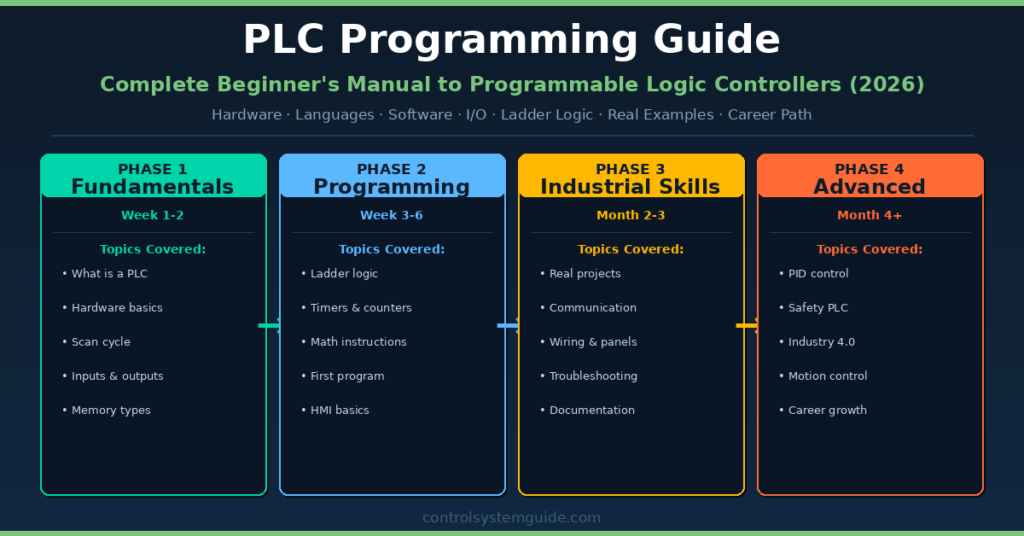
- Complete 4-phase learning roadmap from beginner to professional
- Common PLC programming mistakes and how to avoid them
⚡ Learn 5 PLC Brands in One Course
Want hands-on experience with multiple PLC platforms? The Learn 5 PLCs in a Day course on Udemy covers Allen-Bradley, Siemens, Schneider, Omron, and Delta — with real wiring tutorials, free simulation software, and downloadable circuit diagrams. The fastest way to become versatile across multiple PLC brands.
Disclosure: This is an affiliate link. We may earn a small commission at no extra cost to you, which helps support this free educational content.
What Is PLC Programming?
PLC programming is the process of writing control logic for a Programmable Logic Controller (PLC) to automate machines and industrial processes. A PLC is a rugged industrial computer specifically designed to monitor field inputs (sensors, switches), execute logical operations based on a program, and control field outputs (motors, valves, lamps) in real time.
Unlike traditional computers, PLCs are optimized for deterministic control — meaning they respond predictably and reliably under harsh industrial conditions including extreme temperatures, vibration, electrical noise, and continuous 24/7 operation. PLC programming replaced relay-based control systems starting in 1968 when Dick Morley invented the first PLC, offering higher flexibility, faster troubleshooting, and easier scalability than the rooms full of mechanical relays they replaced.
| Aspect | Detail |
|---|---|
| Definition | Writing software logic to control industrial machines and processes |
| Primary language | Ladder Logic (most common — 80% of all PLC programs) |
| Standard | IEC 61131-3 — defines 5 programming languages |
| Major brands | Siemens, Allen-Bradley/Rockwell, Mitsubishi, Schneider, Omron, Beckhoff |
| Industries | Manufacturing, oil and gas, food and beverage, water treatment, pharma, automotive |
| Career outlook | Very high demand globally — entry-level $55,000+ in US |
| Learning time | 3-4 months to job-ready level with 1-2 hours daily practice |
💡 Why Learn PLC Programming in 2026? Every manufacturing plant, water treatment facility, power plant, and automated production line in the world depends on PLC programmers. The skills are accessible to anyone with basic electrical knowledge, completely learnable using free simulation software, and command salaries from $55,000 entry level to $130,000+ for senior engineers. PLC programming is one of the most stable, in-demand technical careers available today.
Why PLC Programming Matters in Industry
PLC programming sits at the heart of every industrial automation system. Without PLC programmers, factories cannot run, water treatment plants cannot deliver clean water, power grids cannot distribute electricity, and pharmaceutical manufacturing cannot produce life-saving medications. The role is critical infrastructure for the modern economy.
| Industry Sector | How PLC Programming Powers It |
|---|---|
| Manufacturing | Assembly lines, packaging machines, robotic systems, quality control |
| Oil and Gas | Wellhead control, pipeline monitoring, refinery process control |
| Power Generation | Turbine control, switchgear automation, grid stabilization |
| Water Treatment | Pump stations, filtration plants, distribution networks |
| Food and Beverage | Filling lines, batch mixing, CIP cleaning, packaging |
| Pharmaceutical | Bioreactors, tablet pressing, FDA-compliant batch records |
| Automotive | Robotic welding, paint shops, assembly conveyors |
| Mining | Conveyor systems, crushers, ventilation control |
| Building Automation | HVAC, elevators, fire safety systems, access control |
How a PLC Works – The Scan Cycle
Every PLC operates on a continuous loop called the scan cycle. Understanding the scan cycle is fundamental to mastering PLC programming because it determines how your code executes and responds to the real world. The scan cycle typically completes in 1-50 milliseconds depending on program size and PLC speed.
| Step | What Happens | Typical Duration |
|---|---|---|
| 1. Input Scan | PLC reads all input signals from sensors and switches into input image table | 1-5 ms |
| 2. Program Execution | PLC executes user program logic from rung 1 to last rung | 2-20 ms |
| 3. Output Scan | PLC writes output values to output image table → physical outputs update | 1-5 ms |
| 4. Housekeeping | Diagnostics, communication, internal checks, watchdog timer | 1-3 ms |
For a complete deep-dive into the PLC scan cycle with examples and timing diagrams, read: PLC Scan Cycle Explained – Step-by-Step Guide
PLC Hardware Architecture – Complete Overview
Before mastering PLC programming, every engineer must understand the hardware. A PLC is not a single device — it is a modular system of components working together. Each component has a specific function in the overall control system.
| Component | Function | Examples |
|---|---|---|
| CPU (Processor) | Executes program logic, manages memory, controls scan cycle | Siemens S7-1200 CPU 1214C, AB CompactLogix 5380 |
| Power Supply | Converts 110/230 VAC to 24 VDC for PLC and field devices | SITOP, 1606-XL, separate or integrated |
| Digital Input Modules | Reads ON/OFF signals from sensors and switches | 16-channel 24VDC DI modules |
| Digital Output Modules | Sends ON/OFF signals to motors, valves, lamps | Relay output, transistor output modules |
| Analog Input Modules | Reads variable signals (4-20mA, 0-10V) from transmitters | 4-channel 4-20mA AI modules |
| Analog Output Modules | Sends variable signals to control valves, VFDs | 2-channel 4-20mA AO modules |
| Communication Modules | Network connectivity to other PLCs, HMIs, drives | EtherNet/IP, PROFINET, Modbus TCP modules |
| Special Modules | Motion, safety, high-speed counting, RTD/TC | Servo motion, GuardLogix safety, weighing |
For complete details on each PLC IO type with field device examples and wiring guides, read: PLC Inputs and Outputs – DI DO AI AO Complete Guide
The 5 PLC Programming Languages (IEC 61131-3)
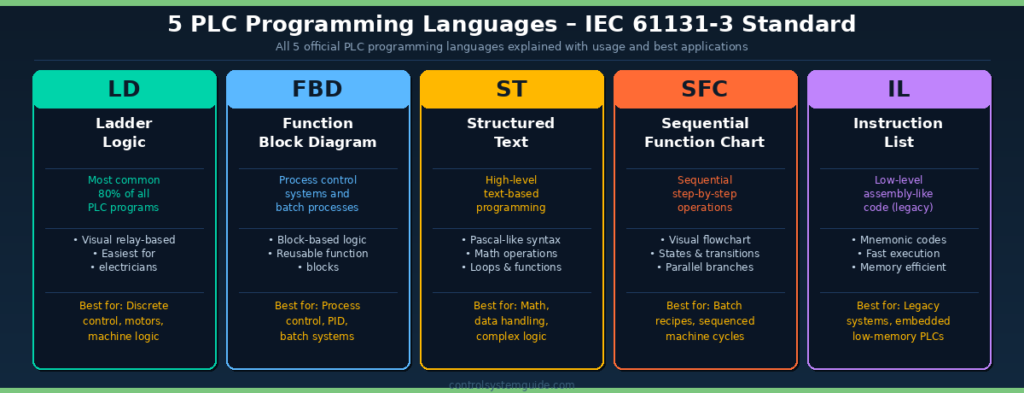
[UPLOAD IMAGE HERE: plc-programming-guide-languages.png — Alt text: 5 PLC programming languages IEC 61131-3 ladder logic FBD structured text SFC instruction list 2026]
The international standard IEC 61131-3 defines 5 official PLC programming languages. Modern PLCs support all 5 — and the best PLC programmers learn at least 2-3 to handle different application types efficiently.
1. Ladder Logic (LD) – Most Common
Ladder Logic is the most widely used PLC programming language — representing approximately 80% of all PLC programs in industry. It uses a graphical notation that resembles electrical relay schematics, making it intuitive for electricians and engineers without software backgrounds. Every major PLC platform supports Ladder Logic natively.
Best for: Discrete control, motor logic, machine sequencing, safety circuits
Read the complete tutorial: PLC Ladder Logic Tutorial – 7 Real Industrial Examples
2. Function Block Diagram (FBD)
FBD uses interconnected functional blocks to represent control logic. Each block performs a specific function (math, logic, timer, PID) and the connections between blocks define data flow. FBD is dominant in process industries because it visually represents the way a process engineer thinks about a system.
Best for: Process control, PID loops, batch systems, continuous control
3. Structured Text (ST)
Structured Text is a high-level text-based programming language with syntax similar to Pascal. It supports complex math operations, IF/THEN/ELSE statements, FOR/WHILE loops, and user-defined functions. ST is the only language for advanced calculations, data manipulation, and algorithms that would be impractical in graphical languages.
Best for: Complex math, data handling, custom algorithms, Industry 4.0 applications
4. Sequential Function Chart (SFC)
SFC describes control sequences as a series of steps with transitions between them — much like a flowchart. Each step contains code (typically in another language like Ladder or ST), and transitions define the conditions to move from one step to the next. SFC excels at modeling batch processes and machine cycles.
Best for: Batch recipes, sequential machine cycles, state machines
5. Instruction List (IL)
Instruction List is a low-level text-based language similar to assembly code. Each line contains one instruction with mnemonics like LD (load), AND, OR, ST (store). IL is rarely used in modern PLC programming — most programmers favor Ladder Logic or Structured Text — but it remains useful for memory-constrained legacy systems.
Best for: Legacy systems, embedded controllers, ultra-low memory applications
For complete language comparison: PLC Programming Languages – All 5 IEC 61131-3 Languages Explained
Best PLC Programming Software for Beginners
Choosing the right PLC programming software is the first practical decision in your learning journey. The best choice depends on which PLC platform you target and your budget. The good news — you can learn PLC programming completely free using simulation software, with no physical hardware required.
| Software | Vendor | Cost | Best For |
|---|---|---|---|
| TIA Portal | Siemens | 21-day free trial + PLCSIM simulator | Siemens S7-1200/1500 — global standard |
| Studio 5000 | Rockwell Automation | 30-day trial + free Logix Emulate | Allen-Bradley CompactLogix/ControlLogix |
| Connected Components Workbench | Rockwell Automation | 100% free forever | Allen-Bradley Micro800 — best free AB option |
| Codesys | 3S-Smart Software | Free demo with full features | Multi-vendor — used by 500+ PLC brands |
| OpenPLC Editor | Open Source | 100% free forever | Open source learning, runs on Raspberry Pi |
| GX Works3 | Mitsubishi | Licensed, demo available | Mitsubishi MELSEC iQ-R/iQ-F PLCs |
| Factory I/O | Real Games | 30-day free trial | 3D factory simulation with any PLC |
Read the complete software comparison: 10 Best PLC Software in 2026 – Free & Paid Tools
Your First PLC Program – Motor Start/Stop Example
Every PLC programmer’s first project is the classic motor start/stop circuit with seal-in logic. This example uses 2 inputs and 1 output to demonstrate the core concepts of PLC programming — input scanning, logic evaluation, and output control.
Inputs and Outputs
| Tag | Type | Description | Address (Siemens / AB) |
|---|---|---|---|
| Start_Button | Digital Input (NO) | Operator pressed start | %I0.0 / Local:1:I.Data.0 |
| Stop_Button | Digital Input (NC) | Stop circuit healthy | %I0.1 / Local:1:I.Data.1 |
| Motor_Run | Digital Output | Motor contactor coil | %Q0.0 / Local:2:O.Data.0 |
Ladder Logic Rung
| Logic | Description |
|---|---|
| [Stop_Button] [(Start_Button) OR (Motor_Run)] ——( Motor_Run )—— | Motor starts on Start press, seals in via Motor_Run, stops on Stop press |
How the Logic Works
- Start condition: Operator presses Start_Button → input goes TRUE → output Motor_Run energizes
- Seal-in: Motor_Run is now TRUE → seal-in contact stays TRUE → motor keeps running even after Start is released
- Stop condition: Operator presses Stop_Button → NC contact opens → entire rung becomes FALSE → Motor_Run de-energizes
- Safety: If Stop_Button wire breaks, NC contact opens automatically → motor stops safely (fail-safe design)
For 6 more complete real industrial examples including conveyor control, tank filling, and traffic light sequencing, read: PLC Ladder Logic Tutorial – 7 Real Examples
How to Calculate PLC IO Requirements
Every PLC programming project starts with calculating the total IO count. The IO count determines which PLC you need, how many expansion modules to buy, and how much the project will cost. Get this wrong and you either run out of capacity during commissioning or waste budget on unused capacity.
The 5-Step IO Calculation Method
| Step | Action | Result |
|---|---|---|
| 1 | List every sensor and switch — these are digital inputs | Total DI count |
| 2 | List every actuator, motor, lamp — these are digital outputs | Total DO count |
| 3 | List every transmitter — these are analog inputs | Total AI count |
| 4 | List every modulating control device — these are analog outputs | Total AO count |
| 5 | Add 25% spare capacity for future expansion | Final IO count for PLC sizing |
Formula: Total IO Count = (DI + DO + AI + AO) × 1.25
For complete worked examples with the free Excel template for IO calculation: PLC I/O Count Calculation – Step-by-Step Method with Excel Template
PLC Communication and Networking
Modern PLC programming is not just about ladder logic — it includes network communication between PLCs, HMIs, drives, and enterprise systems. Industrial Ethernet protocols dominate today’s installations.
| Protocol | Vendor | Used For |
|---|---|---|
| EtherNet/IP | ODVA / Allen-Bradley | Allen-Bradley PLCs, drives, IO. Open standard. |
| PROFINET | Siemens / PI | Siemens PLCs, dominant in Europe and Asia |
| Modbus TCP | Modicon / Open | Universal — supported by virtually every PLC vendor |
| EtherCAT | Beckhoff / EtherCAT Group | High-speed motion control, sub-millisecond response |
| OPC UA | OPC Foundation | SCADA/MES integration, IT/OT data exchange |
| MQTT | OASIS standard | Industry 4.0, IIoT, cloud-bound data publishing |
According to the International Society of Automation (ISA) — the global standards body for industrial automation — PROFINET, EtherNet/IP, and Modbus TCP together account for over 75% of new industrial network installations as of 2026.
PLC vs SCADA vs DCS – Where PLCs Fit
| Aspect | PLC | SCADA | DCS |
|---|---|---|---|
| Function | Direct machine/process control | Supervisory monitoring across distributed sites | Integrated process control for entire plants |
| Response time | Milliseconds | Seconds | Milliseconds (fast loops) |
| Best for | Discrete machines, single equipment | Wide-area monitoring (pipelines, water systems) | Process plants (refineries, chemical, pharma) |
| Programming | Ladder, FBD, ST | HMI tags + scripts | Function blocks + faceplates |
| Cost | Lowest | Medium | Highest |
Read the complete comparison: PLC vs DCS vs SCADA – Full Three-Way Comparison Guide
PLC Programming Career Path and Salary
PLC programming offers some of the most stable, high-paying careers in technical fields. Skills are transferable globally, demand exceeds supply in most markets, and entry barriers are reasonable for anyone with electrical or technical aptitude.
| Role | US Salary Range | Experience Required |
|---|---|---|
| PLC Technician (Entry) | $50,000 – $65,000 | 0-2 years, basic ladder logic |
| Controls Engineer | $65,000 – $95,000 | 2-5 years, full PLC + HMI projects |
| Senior Controls Engineer | $95,000 – $130,000 | 5-10 years, complex systems, motion, safety |
| Automation Architect | $130,000 – $180,000+ | 10+ years, multi-site projects, OT/IT integration |
| SCADA / DCS Engineer | $80,000 – $140,000 | 3-10 years, large-scale process control |
Skills Required for PLC Programming Careers
- Technical: Ladder logic, function block, structured text, IO design, network protocols, HMI development
- Hardware: Wiring, panel design, instrument selection, troubleshooting
- Domain knowledge: One or more industries — manufacturing, water, oil and gas, food, pharma
- Soft skills: Documentation, customer interaction, project management, commissioning
4-Phase PLC Programming Learning Roadmap
Phase 1 – Fundamentals (Week 1-2)
- Read What Is a PLC? Complete Beginner’s Guide
- Understand the PLC Scan Cycle
- Learn PLC Inputs and Outputs (DI DO AI AO)
- Study the 4-20mA Signal Standard
Phase 2 – Programming Basics (Week 3-6)
- Master PLC Ladder Logic with 7 examples
- Learn PLC Timers (TON, TOF, RTO)
- Master PLC Counters (CTU, CTD, CTUD)
- Download free software — start with Codesys or OpenPLC
- Write your first 5 programs in simulator
Phase 3 – Industrial Skills (Month 2-3)
- Learn Siemens S7-1200 OR Allen-Bradley Studio 5000
- Practice creating PLC IO lists
- Learn PLC wiring fundamentals
- Master PLC troubleshooting
- Build 3 portfolio projects
Phase 4 – Advanced Automation (Month 4+)
- PID control loops
- Safety PLC programming (SIL 2/3 systems)
- Motion control and servo systems
- HMI development with FactoryTalk View or WinCC
- Industry 4.0 and IIoT integration
- Apply for entry-level controls positions
Complete roadmap: How to Learn PLC Programming – Complete Beginner Roadmap
Common PLC Programming Mistakes
| Mistake | Consequence | How to Avoid |
|---|---|---|
| No spare IO capacity | Project cannot expand without buying new PLC | Always add 20-25% spare to IO count |
| Reading output coils as logic | Confusing race conditions, hard to troubleshoot | Use internal bits/tags as intermediate logic |
| Hard-coded magic numbers | Cannot tune the system without recompiling | Use HMI-accessible setpoints and parameters |
| Missing safety interlocks | Equipment damage, personnel injury risk | Build safety into hardware AND software layers |
| Mixing AC and DC on same module | PLC module damage, fire risk | Use separate modules for 24VDC and 110/230VAC |
| Wrong NO/NC contact use | Logic works backwards, fails to fail-safe | Stop buttons NC, start buttons NO — always |
| No documentation or comments | Code becomes unmaintainable within months | Comment every rung, every tag, every routine |
| Trying to learn 3 platforms at once | Master none, confuse syntax between brands | Pick ONE platform, master it, then expand |
Frequently Asked Questions – PLC Programming Guide
Is PLC programming hard to learn?
PLC programming is not hard to learn for someone with basic electrical knowledge or technical aptitude. Ladder logic — the most common PLC programming language — was specifically designed for electricians and engineers without software backgrounds. Most beginners can write their first working PLC program within 1-2 weeks of starting. Reaching job-ready competence takes 3-4 months of consistent practice. Advanced topics like motion control and safety systems are harder, but the fundamentals are very accessible.
Can I learn PLC programming without hardware?
Yes. You can complete months of PLC programming learning entirely in free simulation software without buying any physical hardware. Siemens TIA Portal includes PLCSIM (21-day trial). Codesys runs a complete soft PLC on any Windows PC. OpenPLC is 100% free forever. Connected Components Workbench (free Allen-Bradley) includes a built-in simulator. Factory I/O provides 3D factory simulations. Most beginners do not need physical hardware until they get their first job.
Which PLC brand should beginners start with?
The best PLC brand for beginners depends on your target market. If you plan to work in Europe, Middle East, Asia, or globally — start with Siemens S7-1200 and TIA Portal because Siemens has the largest global installed base. If you plan to work in North America — start with Allen-Bradley CompactLogix and Studio 5000 because Rockwell dominates the North American market. If you are unsure which path to take, Siemens TIA Portal with PLCSIM is the most universally applicable starting point because of free simulation and global recognition.
How long does it take to learn PLC programming?
With consistent daily practice of 1-2 hours, most beginners can write basic PLC programs within 3-4 weeks and reach job-ready level within 3-4 months. The fundamentals of ladder logic can be grasped in 2 weeks. Reaching professional competency typically takes 6-12 months of real-world experience after your first job. The PLC programming learning curve is steep at first but flattens quickly once core concepts click into place.
What is the highest paid PLC programming job?
The highest paid PLC programming roles are Automation Architects and Senior Controls Engineers in industries like oil and gas, pharmaceutical manufacturing, and semiconductor fabrication. These roles typically pay $130,000 to $180,000+ in the United States. Specialization in safety PLC programming, motion control, or process industries commands premium salaries. Independent PLC programming consultants and systems integrators in high-demand markets often earn $150-250 per hour or more on contract work.
Do PLC programmers need a degree?
A formal engineering degree is not required for most PLC programming jobs — but it helps with career progression. Many successful PLC programmers come from backgrounds as electricians, instrumentation technicians, or maintenance technicians who self-taught the software side. Associate degrees in electrical or industrial automation technology are common entry points. For senior controls engineering and architect roles, a Bachelor’s degree in electrical, mechanical, or chemical engineering becomes more important. Practical hands-on experience often matters more than credentials in PLC programming careers.
What is the difference between PLC programming and computer programming?
PLC programming targets industrial control problems with deterministic real-time response, while computer programming targets general-purpose applications. PLC programming uses graphical languages like Ladder Logic and Function Block Diagram. Computer programming uses text-based languages like Python, C++, and Java. PLC programs run on dedicated hardware with rugged environmental tolerance and continuous 24/7 operation. Computer programs run on general-purpose operating systems. PLC programming requires deep understanding of electrical hardware, sensors, and field devices — computer programming does not.
What are the 5 PLC programming languages?
The international standard IEC 61131-3 defines 5 official PLC programming languages: Ladder Diagram (LD/Ladder Logic) — the most common, graphical, relay-style; Function Block Diagram (FBD) — block-based, used heavily in process control; Structured Text (ST) — high-level Pascal-like text; Sequential Function Chart (SFC) — flowchart-style for sequenced operations; Instruction List (IL) — assembly-like low-level language now considered legacy. Modern PLCs support all 5 languages and professional PLC programmers typically learn at least 2-3 to handle different application types.
Conclusion
PLC programming is one of the most valuable, stable, and accessible technical skills in the modern industrial economy. Whether you are starting from zero or transitioning from a related field, this PLC programming guide gives you the complete roadmap to take you from beginner to professional competency.
Key takeaways from this PLC programming guide:
- PLC programming is learnable — anyone with basic electrical aptitude can master it
- Ladder Logic is the foundation — 80% of all PLC programs use it
- Free simulation is enough — months of learning possible without buying hardware
- Pick one platform first — Siemens (global) or Allen-Bradley (North America)
- 4-phase roadmap — fundamentals → programming → industrial → advanced
- Career outlook is excellent — entry $55K, senior $130K+, very stable demand
- Practice daily 1-2 hours — job-ready in 3-4 months with consistency
Start your PLC programming journey today: