Last Updated: April 2026 | Reviewed by automation engineers with 10+ years of industrial experience.
Finding the right PLC programming software for beginners is one of the most important decisions you’ll make. This guide covers the best PLC programming software for beginners available in 2026.
With dozens of tools available — free platforms, professional environments, and 3D simulators — it can feel overwhelming to know where to start.
In this guide, you’ll find the 10 best PLC software tools in 2026, each one reviewed with real pros, cons, pricing, and honest recommendations based on your experience level.
Whether you’re a student, a technician, or an engineer switching careers — this guide will help you pick the right tool and start programming immediately.
⚡ Complete PLC Programming Bootcamp
Once you have your PLC software set up, the next step is learning how to actually program. The Complete PLC Programming Course (10-Day Programmer) on Udemy takes you from beginner to job-ready in just 10 days — taught by an industrial automation engineer who shares the real-world programming approach employers expect. Includes example code and project templates.
Disclosure: This is an affiliate link. We may earn a small commission at no extra cost to you, which helps support this free educational content.
Best PLC Programming Software for Beginners – Quick Picks
These tools cover both learning and real industrial applications. Whether free or paid, each of these options qualifies as the best PLC programming software for beginners at different stages of learning.
| Software | Type | Price | Best For |
|---|---|---|---|
| Codesys | Programming + Simulation | Free | Absolute beginners |
| Siemens TIA Portal | Programming | Paid (~$2,000+) | Industrial/Siemens jobs |
| RSLogix / Studio 5000 | Programming | Paid (~$3,000+) | Rockwell/Allen-Bradley |
| LogixPro | Simulator | ~$49 one-time | Training & ladder logic practice |
| Factory I/O | 3D Simulator | ~$99–$280/year | Visual simulation |
| OpenPLC Editor | Programming | Free | Open-source learners |
| Zelio Soft | Programming | Free | Small automation projects |
| Mitsubishi GX Works3 | Programming | ~$879 (license) | Mitsubishi PLC systems |
| Beckhoff TwinCAT 3 | Programming | Free (engineering); runtime paid | PC-based & advanced control |
| EcoStruxure Machine Expert | Programming | Free basic; ~$2,000–5,000 full | Schneider Electric PLCs |
👉 If you’re just getting started: Begin with Codesys or OpenPLC Editor — both are free and require no hardware.
1. Codesys – Best Free PLC Software for Beginners
Codesys is the most widely recommended free PLC programming software for beginners and the top choice for anyone starting out in industrial automation. It supports all five IEC 61131-3 programming languages and includes a built-in software simulator, meaning you can write and test real PLC programs without any physical hardware.
It is vendor-neutral, meaning programs written in Codesys can run on hardware from over 500 different PLC manufacturers — making it one of the most versatile tools available.
⭐ Best For: Beginners who want to learn PLC programming without spending money or buying hardware
💰 Pricing: Free to download and use. Runtime licenses may apply when deploying to physical hardware (varies by manufacturer).
🖥️ Supported OS: Windows 7 / 8 / 10 / 11
💻 Supported Languages: Ladder Logic (LD), Function Block Diagram (FBD), Structured Text (ST), Sequential Function Chart (SFC), Instruction List (IL)
✅ Pros:
- Completely free — no credit card or trial period
- Supports all 5 IEC 61131-3 programming languages
- Built-in simulator — practice without any PLC hardware
- Compatible with 500+ PLC manufacturers worldwide
- Large online community, tutorials, and documentation
- Includes visualization tools for building basic HMI screens
❌ Cons:
- Interface can feel overwhelming for absolute beginners
- Runtime licensing becomes complex when deploying to real hardware
- Not tied to a specific brand — some employers expect brand-specific software experience
2. Siemens TIA Portal – Best for Industrial & Professional Use
Siemens TIA Portal (Totally Integrated Automation Portal) is the industry-standard software used to program Siemens S7-1200 and S7-1500 PLCs — the most widely deployed PLC hardware in Europe and many parts of Asia and the Middle East.
If your goal is to get a job in industrial automation, learning TIA Portal gives you a direct advantage because Siemens PLCs are used in manufacturing plants, water treatment facilities, power generation, and food processing industries worldwide.
⭐ Best For: Engineers and technicians targeting industrial automation jobs with Siemens hardware
💰 Pricing: Paid — entry-level licenses start around $2,000+. A 21-day free trial is available.
🖥️ Supported OS: Windows 10 / Windows 11 (64-bit)
💻 Supported Languages: Ladder Logic (LAD), Function Block Diagram (FBD), Structured Text (SCL), Sequential Function Chart (GRAPH), Statement List (STL)
✅ Pros:
- Industry standard software used in real factories globally
- Integrated hardware configuration, programming, and diagnostics in one tool
- Built-in PLCSIM simulation — test programs without real hardware
- Strong documentation via Siemens Industry Online Support and official Siemens training resources
- Seamless integration with Siemens HMI, drives, and SCADA systems
❌ Cons:
- Expensive for personal learning (commercial license ~$2,000+)
- Requires powerful PC hardware to run smoothly
- Steep learning curve for absolute beginners
- Limited to Siemens hardware ecosystems
👉 Learn more about Siemens TIA Portal
3. RSLogix 500 / Studio 5000 – Best for Rockwell Allen-Bradley PLCs
RSLogix 500 and Studio 5000 Logix Designer are the programming environments for Allen-Bradley PLCs from Rockwell Automation — the dominant PLC manufacturer in North America. If you plan to work in the United States, Canada, or in automotive or food manufacturing industries, knowing Studio 5000 is practically a requirement.
RSLogix 500 is used for older MicroLogix and SLC 500 PLCs. Studio 5000 is the current platform for the modern ControlLogix and CompactLogix families.
⭐ Best For: Professionals targeting North American industrial automation jobs, especially automotive, packaging, and food manufacturing
💰 Pricing: Paid — Studio 5000 licenses start around $3,000+. RSLogix Micro Starter Lite is available free for MicroLogix 1000/1100.
🖥️ Supported OS: Windows 10 / Windows 11
💻 Supported Languages: Ladder Logic (LD), Function Block Diagram (FBD), Structured Text (ST), Sequential Function Chart (SFC)
✅ Pros:
- Most widely used PLC software in North America
- RSLogix Micro Starter Lite available for free for basic practice
- Extensive tag-based programming system — easier to manage large projects
- Strong job market demand for Studio 5000 skills
- Full diagnostics and online editing support
❌ Cons:
- Very expensive for personal use (full license ~$3,000+)
- Locked to Rockwell/Allen-Bradley hardware only
- Limited free options for learning
- Heavy software — requires a capable Windows PC
👉 Explore Rockwell Automation PLC Software
4. LogixPro – Best PLC Simulator for Training
LogixPro is a dedicated PLC simulator designed specifically for learning and training. It simulates Allen-Bradley PLC behavior and allows beginners to write and test ladder logic programs in realistic industrial scenarios — all without any hardware or expensive software licenses.
It is widely used in technical colleges, vocational schools, and corporate training programs as a hands-on introduction to PLC programming.
⭐ Best For: Students, beginners, and vocational learners who want to practice ladder logic in realistic simulated environments
💰 Pricing: ~$49 one-time purchase (30-day free trial available)
🖥️ Supported OS: Windows
💻 Supported Languages: Ladder Logic (LD)
✅ Pros:
- Affordable one-time cost (~$49)
- Simulates real Allen-Bradley style PLCs with I/O panels
- Includes pre-built industrial scenarios (conveyor, tank, traffic light)
- Perfect for complete beginners — no setup complexity
- Used in technical education programs worldwide
❌ Cons:
- Only supports Ladder Logic — no other IEC languages
- Simulation only — cannot connect to real hardware
- Interface looks dated compared to modern tools
- Limited to basic training scenarios
5. Factory I/O – Best 3D PLC Simulation Software
Factory I/O is a unique 3D industrial simulation platform that lets you see your PLC programs controlling virtual machines in real time. Instead of abstract diagrams, you watch conveyors move, tanks fill, and robotic arms operate — all driven by the logic you write.
It connects to real PLC software (TIA Portal, Codesys, Studio 5000) or its own built-in controller, making it an excellent bridge between learning and real-world application.
⭐ Best For: Visual learners who want to see exactly how their PLC logic interacts with machines before working on real equipment
💰 Pricing: ~$99/year (Personal) to ~$280/year (Professional). 30-day free trial available.
🖥️ Supported OS: Windows 10 / 11 (64-bit, dedicated GPU recommended)
💻 Supported Languages: Compatible with Ladder Logic and other languages via connected PLC software
✅ Pros:
- Stunning 3D visualization makes learning intuitive and engaging
- Connects to real PLC software (TIA Portal, Codesys, Studio 5000, and more)
- 20+ pre-built industrial scenes included (conveyors, sorting, palletizing)
- Excellent for understanding how I/O interacts with physical machines
- Used in universities and training centers worldwide
❌ Cons:
- Subscription cost may be a barrier for some beginners
- Requires a reasonably powerful PC with dedicated graphics
- Not a standalone programming environment — needs external PLC software
6. OpenPLC Editor – Best Free Open-Source PLC Software
OpenPLC Editor is a completely free, open-source PLC programming environment that fully complies with the IEC 61131-3 standard. It was originally built for educational and research purposes but has grown into a capable platform used by engineers and students worldwide.
One of its biggest advantages is flexibility — OpenPLC Runtime can run on hardware as simple as a Raspberry Pi or Arduino, making it ideal for low-cost learning setups.
⭐ Best For: Learners who want a free, open-source PLC environment with hardware flexibility
💰 Pricing: Completely free (open-source). Optional training runtime licenses for Raspberry Pi ~$60–$90 via the CODESYS store.
🖥️ Supported OS: Windows, Linux, macOS
💻 Supported Languages: Ladder Logic (LD), Function Block Diagram (FBD), Structured Text (ST), Sequential Function Chart (SFC), Instruction List (IL)
✅ Pros:
- 100% free — no licensing costs at all
- Runs on Raspberry Pi, Arduino, and Linux systems for low-cost hardware practice
- Supports all 5 IEC 61131-3 programming languages
- Active open-source community on GitHub with regular updates
- Good for IoT and home automation projects as well as industrial learning
❌ Cons:
- Less polished user interface than commercial alternatives
- Documentation is not as comprehensive as paid tools
- Community support only — no official technical helpdesk
- Not used in most professional industrial environments
7. Zelio Soft – Best for Small Automation Projects
Zelio Soft is a simple, beginner-friendly programming tool developed by Schneider Electric for its Zelio Logic Smart Relays. It is designed for small automation tasks such as lighting control, HVAC systems, and simple machine sequencing.
While it is not a full-scale industrial PLC platform, it is an excellent entry point for complete beginners who want to understand basic automation logic without being overwhelmed by complex software.
⭐ Best For: Complete beginners and small automation projects with basic logic requirements
💰 Pricing: Free to download
🖥️ Supported OS: Windows
💻 Supported Languages: Ladder Logic (LD), Function Block Diagram (FBD)
✅ Pros:
- Free to download and use
- Extremely simple interface — ideal for total beginners
- Includes built-in simulation for basic testing
- Good for understanding fundamental PLC concepts without complexity
❌ Cons:
- Limited to Schneider Zelio Smart Relay hardware only
- Not suitable for large or complex industrial projects
- Very limited language support compared to full PLC platforms
- Not widely required in professional industrial job roles
8. Mitsubishi GX Works3 – Best for Mitsubishi PLC Systems
Mitsubishi GX Works3 is the official programming software for Mitsubishi Electric’s MELSEC iQ-R and iQ-F series PLCs — some of the most widely used PLC hardware in Asia, automotive manufacturing, and high-speed production lines.
It is a professional-grade tool with an intuitive graphical interface, drag-and-drop module configuration, and strong multi-language support. Engineers working in Mitsubishi-heavy environments will find GX Works3 essential.
⭐ Best For: Engineers and technicians working with Mitsubishi Electric PLCs in automotive, packaging, or Asian industrial markets
💰 Pricing: ~$879 per single-user license (GX-WORKS3-C1). Contact Mitsubishi Electric distributors for regional pricing.
🖥️ Supported OS: Windows 10 / Windows 11
💻 Supported Languages: Ladder Logic (LD), Structured Text (ST), Function Block Diagram (FBD), Sequential Function Chart (SFC)
✅ Pros:
- Industry-standard tool for Mitsubishi MELSEC PLC systems
- Intuitive drag-and-drop hardware configuration
- Supports structured programming for large, multi-user projects
- Extensive MELSOFT library with pre-built function blocks
- Multi-language interface supports global teams
- Strong diagnostics and online monitoring tools
❌ Cons:
- Expensive license (~$879 per user)
- Locked to Mitsubishi hardware only
- Requires purchase of Mitsubishi PLC hardware for real testing
- Not available as a free trial for extended learning
👉 Learn more about Mitsubishi GX Works3
9. Beckhoff TwinCAT 3 – Best for Advanced & PC-Based Control
Beckhoff TwinCAT 3 is a powerful and unique PLC platform that turns a standard Windows PC into a fully functional real-time PLC. Unlike traditional PLC software, TwinCAT 3 integrates PLC programming with motion control, CNC, robotics, and even C++ and MATLAB code — all in one environment.
The engineering environment (XAE) is free to install and use. Runtime licenses are required for deployment and are priced based on hardware performance level. A free 7-day trial license (renewable) is available for testing and commissioning.
⭐ Best For: Advanced learners and engineers interested in PC-based control, motion control, and high-performance automation systems
💰 Pricing: Engineering environment (XAE) is free. Runtime licenses are paid and vary by platform level. 7-day renewable trial license available for free testing.
🖥️ Supported OS: Windows 10 / Windows 11 (integrates with Visual Studio)
💻 Supported Languages: Ladder Logic (LD), Function Block Diagram (FBD), Structured Text (ST), Sequential Function Chart (SFC), C++, MATLAB/Simulink integration
✅ Pros:
- Engineering environment is completely free
- Turns any Windows PC into a real-time PLC — no dedicated hardware needed to start
- Supports PLC, motion control, CNC, and robotics in one platform
- C++ and MATLAB integration for advanced control algorithms
- 7-day renewable trial license — can practice for free indefinitely
- Widely used in high-performance manufacturing and robotics
❌ Cons:
- Steep learning curve — not recommended as a first PLC tool
- Runtime licenses can be expensive for commercial deployment
- Requires Visual Studio installation (adds complexity)
- Primarily suitable for Beckhoff hardware in production environments
👉 Learn more about Beckhoff TwinCAT 3
10. EcoStruxure Machine Expert – Best for Schneider Electric PLCs
EcoStruxure Machine Expert (formerly SoMachine) is Schneider Electric’s programming environment for its Modicon M241, M251, and M262 PLC series. It is built on the CODESYS platform, which means it supports the same IEC 61131-3 programming languages and feels familiar to anyone who has used Codesys before.
It is particularly strong for machine builders working with Schneider drives, servo systems, and HMI screens, as everything integrates seamlessly within the same environment.
⭐ Best For: Engineers working with Schneider Electric PLCs and machine builders who need integrated PLC, motion, and HMI programming
💰 Pricing: Basic version is free to download. Full professional suites range from ~$2,000 to $5,000 depending on modules.
🖥️ Supported OS: Windows 10 / Windows 11
💻 Supported Languages: Ladder Logic (LD), Function Block Diagram (FBD), Structured Text (ST), Sequential Function Chart (SFC), Instruction List (IL)
✅ Pros:
- Based on Codesys — familiar interface if you’ve used Codesys before
- Free basic version available for learning and evaluation
- Excellent integration with Schneider drives, HMIs, and servo systems
- Built-in simulation for testing without hardware
- IIoT connectivity and cloud data features built in
- Strong for packaging, food processing, and conveyor applications
❌ Cons:
- Full suite is expensive for personal use
- Locked to Schneider Electric hardware
- Some features require additional paid modules
- EcoStruxure Control Expert (for M340/M580) is a different, separate tool — can cause confusion
👉 Learn more about EcoStruxure Machine Expert
Best Free PLC Simulator for Beginners 2026 – Top 6 Simulators Compared
The best free PLC simulator for beginners 2026 is one that lets you write, test and run real ladder logic programs without buying any physical hardware. The good news is that there are now several excellent free PLC simulators for beginners 2026 — covering every major industrial brand from Siemens to Allen Bradley to open-source platforms.
This section reviews the top 6 best free PLC simulators 2026 every beginner should know — with honest comparisons of features, limitations, and which one is best for your specific learning goal.
The 6 best free PLC simulators 2026 listed below are each designed for a specific learning goal — from open-source flexibility to industry-standard skills. Pick the simulator that matches your career path.
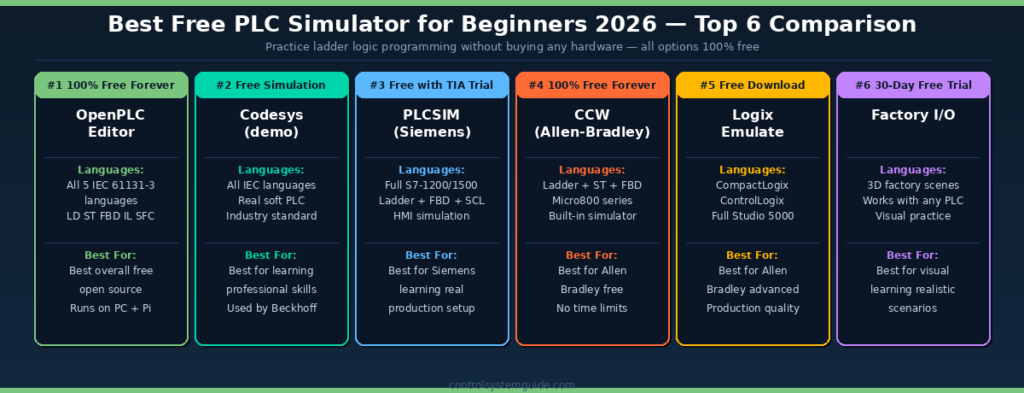
Top 6 Best Free PLC Simulators 2026 – Comparison Table
| Rank | Simulator | License | Languages | Best For Beginners |
|---|---|---|---|---|
| 🥇 #1 | OpenPLC Editor | 100% Free Forever | LD, ST, FBD, IL, SFC (all 5 IEC 61131-3) | Best overall free PLC simulator — open source, runs on PC and Raspberry Pi |
| 🥈 #2 | Codesys Demo | Free simulation mode | All IEC 61131-3 languages | Best for learning professional industry-standard skills (used by Beckhoff, WAGO) |
| 🥉 #3 | Siemens PLCSIM | Free with TIA Portal trial | Ladder, FBD, SCL, GRAPH | Best free PLC simulator for Siemens S7-1200/1500 learning |
| #4 | Connected Components Workbench | 100% Free Forever | Ladder, Structured Text, FBD | Best free Allen Bradley PLC simulator — Micro800 series, no time limits |
| #5 | Logix Emulate | Free download with Studio 5000 | All Studio 5000 languages | Best for advanced Allen Bradley CompactLogix and ControlLogix learning |
| #6 | Factory I/O | 30-day free trial | Works with any PLC software | Best for visual practice — 3D factory scenes connect to your simulator |
#1 OpenPLC Editor – Best Overall Free PLC Simulator 2026
OpenPLC Editor is widely considered the best free PLC simulator for beginners in 2026 — and for good reason. It is 100% free forever, completely open source, supports all 5 IEC 61131-3 programming languages (Ladder Diagram, Structured Text, Function Block Diagram, Instruction List, and Sequential Function Chart), and can run on Windows, Linux, macOS, and even Raspberry Pi.
The companion OpenPLC Runtime is a software PLC that executes programs created in OpenPLC Editor — making it perfect for learning, prototyping, and even industrial soft-PLC deployments. There are no time restrictions, no tag count limits, and no feature caps. Skills learned in OpenPLC transfer directly to commercial platforms.
Best for: Beginners who want a completely free, no-strings-attached PLC simulator that supports all programming languages and runs on cheap hardware.
#2 Codesys Demo – Best Industry-Standard Free PLC Simulator
Codesys is the most feature-complete free PLC simulator available in 2026 for IEC 61131-3 programming. The demo version includes full programming capabilities with simulation mode — and Codesys uses a true softPLC architecture, meaning the simulated program runs on your development PC exactly as it would on actual industrial hardware.
The biggest advantage of Codesys is transferability — many commercial PLCs from Beckhoff, WAGO, ABB, Eaton, and dozens of other manufacturers use Codesys-based development environments. Skills you build practicing on the free Codesys simulator transfer directly to professional projects.
Best for: Beginners who want to learn the most professional, industry-standard PLC programming environment without committing to a single brand.
#3 Siemens PLCSIM – Best Free PLC Simulator for Siemens Learning
PLCSIM is included free with the Siemens TIA Portal 21-day trial — and it is the only way to get genuine Siemens S7-1200 and S7-1500 simulation experience without buying hardware. PLCSIM lets you run a complete simulated S7 PLC on your PC, download programs to it, monitor variables online, and test HMI screens — exactly like working with a real Siemens controller.
Although the TIA Portal trial expires after 21 days, you can renew the trial multiple times by reinstalling, or transition to the OpenPLC and Codesys options for longer-term free practice.
Best for: Beginners targeting careers in Europe, Middle East, Asia, or any region where Siemens is the dominant PLC platform.
#4 Connected Components Workbench – Best Free Allen Bradley Simulator
Connected Components Workbench (CCW) is the only completely free, no-time-limit PLC simulator from a major industrial brand. It is the official Allen Bradley programming software for Micro800 series PLCs and includes a built-in simulator that supports Ladder Logic, Structured Text, and Function Block Diagram.
The latest version (v22) includes simulation in the free version with no restrictions — making it the easiest way to start learning Allen Bradley programming with zero financial commitment. The interface is clean and is built on Microsoft Visual Studio.
Best for: Beginners targeting careers in North American manufacturing where Allen Bradley dominates the market.
#5 Logix Emulate – Best Free Simulator for CompactLogix and ControlLogix
Logix Emulate is the free software PLC simulator that pairs with Studio 5000 Logix Designer. Once you have downloaded the Studio 5000 30-day trial, Logix Emulate lets you run a complete CompactLogix or ControlLogix controller in software — including all the advanced features that CCW does not support.
This is the closest you can get to professional Rockwell Automation programming without buying real hardware — perfect for learning tag-based addressing, EtherNet/IP, and complex motion control concepts.
Best for: Intermediate beginners ready to move beyond Micro800 to professional CompactLogix and ControlLogix programming.
#6 Factory I/O – Best Visual Practice for PLC Simulators
Factory I/O is different from the other 5 entries on this list — it is not a PLC simulator itself but rather a 3D factory environment that connects to any PLC software. You design ladder logic in PLCSIM, Codesys, or CCW — then watch your program control realistic 3D conveyors, sorters, robotic arms, and tank systems.
The 30-day free trial includes access to all factory scenes. After the trial Factory I/O requires a paid license but the trial provides plenty of time for foundational learning.
Best for: Visual learners who want to see their PLC programs control realistic factory equipment in 3D.
Which of the Best Free PLC Simulators 2026 Should a Beginner Start With?
| Your Goal | Recommended Free PLC Simulator 2026 | Why |
|---|---|---|
| Just exploring PLCs for the first time | OpenPLC Editor | 100% free forever, all languages, easiest to install |
| Career in Siemens-heavy markets | PLCSIM with TIA Portal trial | Real Siemens experience for 21 days free |
| Career in North American manufacturing | Connected Components Workbench | Free Allen Bradley experience forever |
| Want professional industry-standard skills | Codesys Demo | Used by 100+ PLC brands worldwide |
| Visual learner, want realistic scenarios | Factory I/O + any PLC simulator | 3D factory environments make learning engaging |
| Want hands-on with cheap hardware later | OpenPLC + Raspberry Pi | Same software runs on Pi for $35 |
💡 Best Free PLC Simulators 2026 – Recommended Learning Path: Start with OpenPLC Editor for week 1-2 (zero commitment, learn the basics) → install Connected Components Workbench in week 3-4 (real Allen Bradley experience, free forever) → then download TIA Portal Trial with PLCSIM in week 5-6 (real Siemens experience). This three-stage approach exposes you to all major PLC platforms entirely free.
PLC Software Comparison Table (2026)
| Software | Type | Price | OS | Languages | Best For |
|---|---|---|---|---|---|
| Codesys | Programming + Sim | Free | Windows | LD, FBD, ST, SFC, IL | Beginners |
| TIA Portal | Programming | ~$2,000+ | Windows | LAD, FBD, SCL, GRAPH | Siemens industrial |
| Studio 5000 | Programming | ~$3,000+ | Windows | LD, FBD, ST, SFC | Rockwell/North America |
| LogixPro | Simulator | ~$49 | Windows | LD | Training & students |
| Factory I/O | 3D Simulator | ~$99–$280/yr | Windows | Via connected software | Visual learners |
| OpenPLC Editor | Programming | Free | Win/Linux/Mac | LD, FBD, ST, SFC, IL | Open-source learners |
| Zelio Soft | Programming | Free | Windows | LD, FBD | Small projects, beginners |
| GX Works3 | Programming | ~$879 | Windows | LD, ST, FBD, SFC | Mitsubishi PLC systems |
| TwinCAT 3 | Programming | Free (engineering) | Windows | LD, FBD, ST, SFC, C++ | Advanced/PC-based control |
| EcoStruxure ME | Programming | Free–$5,000 | Windows | LD, FBD, ST, SFC, IL | Schneider Electric systems |
Free vs Paid PLC Software – Which Should You Choose?
Start with free software if:
- You are a complete beginner
- You don’t yet know which PLC brand you’ll work with
- You want to learn the concepts before investing money
Move to paid software when:
- You know which PLC brand your employer or industry uses
- You are preparing for a specific job or certification
- You need to work on real industrial projects
When choosing PLC programming software for beginners, the best approach is:: Start with Codesys (free) → Practice with LogixPro or Factory I/O → Learn TIA Portal or Studio 5000 based on your target industry.
How to Choose PLC Software as a Beginner
Choosing the right PLC programming software for beginners comes down to four key questions:
1. What PLC hardware does my target industry use?
- Siemens → TIA Portal
- Allen-Bradley / Rockwell → Studio 5000
- Mitsubishi → GX Works3
- Schneider → EcoStruxure Machine Expert
- Any brand → Codesys
2. Do I have a budget?
- No budget → Codesys or OpenPLC Editor
- Small budget (~$49) → LogixPro
- Professional investment → TIA Portal or Studio 5000
3. Do I have physical PLC hardware?
- No hardware → Codesys, LogixPro, Factory I/O, or TwinCAT 3 (all include simulation)
- Yes hardware → Match the software to your hardware brand
4. What is my experience level?
- Complete beginner → Codesys, LogixPro, Zelio Soft
- Intermediate → TIA Portal, Studio 5000, GX Works3
- Advanced → TwinCAT 3, EcoStruxure Machine Expert
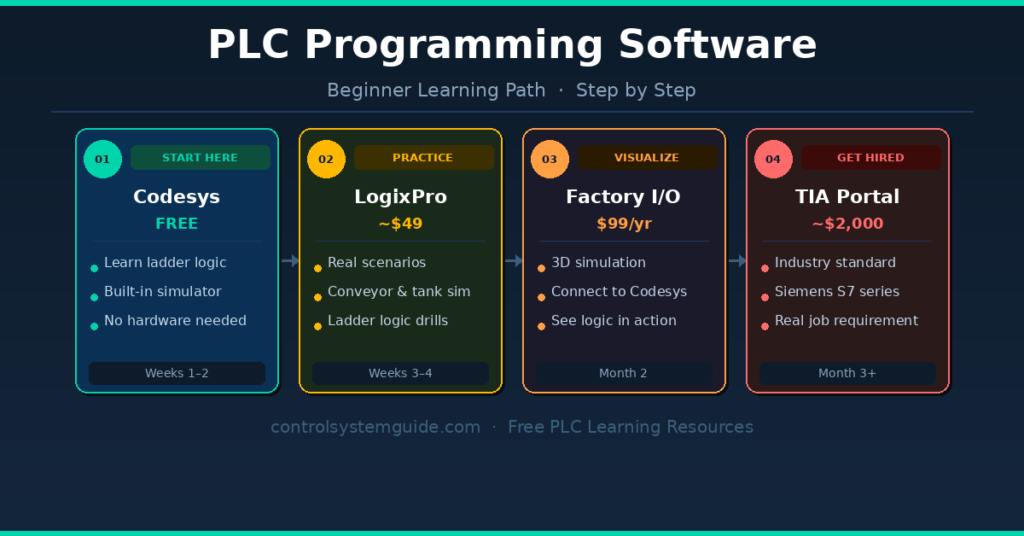
Recommended Beginner Learning Path
Follow this path if you’re starting from zero:
Week 1–2: Download Codesys (free) → Complete the built-in examples → Write your first ladder logic program
Week 3–4: Practice with LogixPro simulations — conveyor systems, tank control, traffic lights
Month 2: Try Factory I/O — connect it to Codesys and watch your logic control 3D machines
Month 3+: Learn TIA Portal or Studio 5000 based on the industry and jobs in your area
Before writing your first program, understanding how PLC inputs and outputs are structured is essential. 👉 Read: PLC IO List Explained 👉 Read: PLC IO List Example – Step by Step
Frequently Asked Questions
What is the best free PLC software for beginners? Codesys is the best free PLC software for beginners in 2026. It supports all five IEC 61131-3 programming languages, includes a built-in simulator, and requires no physical hardware to get started. OpenPLC Editor is also a strong free alternative, especially for learners who want open-source flexibility.
What PLC software does Siemens use? Siemens uses TIA Portal (Totally Integrated Automation Portal) for programming its S7-1200, S7-1500, and S7-300/400 PLC series. It is the standard programming environment for all modern Siemens automation projects.
Is Codesys completely free? The Codesys development environment is free to download and use for programming and simulation. Runtime licenses may be required when deploying programs to physical hardware, and pricing varies depending on the hardware manufacturer and platform.
What is the most widely used PLC software in industry? Siemens TIA Portal and Rockwell Studio 5000 are the two most widely used PLC programming platforms in global industry. TIA Portal dominates in Europe and Asia, while Studio 5000 is the standard in North America, particularly in automotive and food manufacturing.
Can I learn PLC programming without hardware? Yes. Tools like Codesys, LogixPro, Factory I/O, and TwinCAT 3 include built-in simulators that allow you to write, test, and run PLC programs without any physical hardware. This makes it possible to learn PLC programming completely for free at home.
What PLC software should a beginner start with in 2026? Most beginners should start with Codesys — it is the best PLC programming software for beginners because it is free, supports all IEC programming languages, includes simulation, and works with hundreds of hardware manufacturers. Once you know which industry you want to work in, you can then focus on the brand-specific software used in that field.
Which PLC software is best for getting a job? Siemens TIA Portal and Rockwell Studio 5000 are the most in-demand PLC software skills in the job market in 2026. Learning either of these alongside Codesys gives you the strongest combination of free learning and professional employability.
What is the difference between RSLogix 500 and Studio 5000? RSLogix 500 is used for older Allen-Bradley SLC 500 and MicroLogix PLCs. Studio 5000 Logix Designer is the current platform for modern Allen-Bradley ControlLogix and CompactLogix PLCs. For new learners, Studio 5000 is the recommended platform to focus on.
Final Recommendation
The best PLC programming software for beginners in 2026 is one that matches your budget, your learning goals, and the industry you want to work in.
Start here:
- Zero budget → Codesys or OpenPLC Editor
- Want realistic practice → Add LogixPro (~$49) or Factory I/O
- Targeting Siemens jobs → Learn TIA Portal (free trial available)
- Targeting North American jobs → Learn Studio 5000
No matter which tool you choose, the most important thing is to start programming immediately. The concepts of PLC logic — inputs, outputs, timers, counters, and sequences — are the same across all platforms.
👉 Ready to understand how real PLC projects are structured? Start here: Complete PLC Programming Guide for Beginners

Automation engineer based in Asia, with hands-on experience in PLC programming, SCADA, and industrial control systems across oil and gas, power, food and beverage, and water industries. Writes about PLC fundamentals, ladder logic, vendor-specific instruction sets for Siemens, Allen-Bradley, and other major platforms, and industrial communication protocols.