
Last Updated: April 2026 | Written for beginners and engineers new to Siemens PLC programming.
This Siemens S7-1200 tutorial is your complete beginner guide to the world’s most widely used compact PLC. The S7-1200 is the standard entry point for Siemens automation — used in packaging machines, conveyor systems, water treatment plants, building automation, and thousands of other applications globally.
In this complete S7-1200 tutorial you will learn:
- What the Siemens S7-1200 is and how it compares to other Siemens PLCs
- All 5 CPU models explained — which one to choose for your project
- How to set up TIA Portal and create your first project step by step
- Complete IO addressing guide — %I, %Q, %IW, %QW addresses explained
- How to write your first ladder logic program on the S7-1200
- S7-1200 timers and counters — TON, TOF, TONR, CTU, CTD in TIA Portal
- How to connect and communicate — PROFINET, Modbus TCP, OPC-UA
⚡ Master Siemens TIA Portal Faster
Want to go deeper into Siemens PLC programming with hands-on projects? The Siemens PLC Mastery TIA Portal V20 course on Udemy is both a Bestseller and Highest Rated — covers ladder diagrams, HMI integration, PID control, and real-world projects with WinCC. A perfect complement to this free tutorial.
Disclosure: This is an affiliate link. We may earn a small commission at no extra cost to you, which helps support this free educational content.
What Is the Siemens S7-1200? – Tutorial Overview
The Siemens S7-1200 is a compact, modular PLC from Siemens’ SIMATIC family. Launched in 2009 to replace the older S7-200 series, it quickly became the world’s most popular compact PLC — combining powerful processing, built-in PROFINET communication, and seamless integration with Siemens TIA Portal programming software.
The S7-1200 sits in the middle of the Siemens PLC product range:
| Siemens PLC Family | Size | Target Application | Comparable AB Model |
|---|---|---|---|
| LOGO! | Nano | Simple standalone machines, <20 IO | Micro820 |
| S7-1200 | Compact | Small-medium machines, up to 284 IO | CompactLogix 5380 |
| S7-1500 | Modular | Large machines, process control, motion | ControlLogix 5580 |
| S7-400 | High-end | Large-scale plant control, safety | GuardLogix 5580 |
The S7-1200 is programmed exclusively using Siemens TIA Portal (Totally Integrated Automation Portal) — the unified engineering software for all Siemens automation products. TIA Portal supports Ladder Diagram (LAD), Function Block Diagram (FUP), Structured Text (SCL), and Sequential Function Chart (GRAPH) for S7-1200 programming.
To understand how PLCs work in general before diving into the S7-1200 specifically, read: What Is a PLC? Complete Beginner’s Guide
Siemens S7-1200 Tutorial – CPU Models Complete Comparison
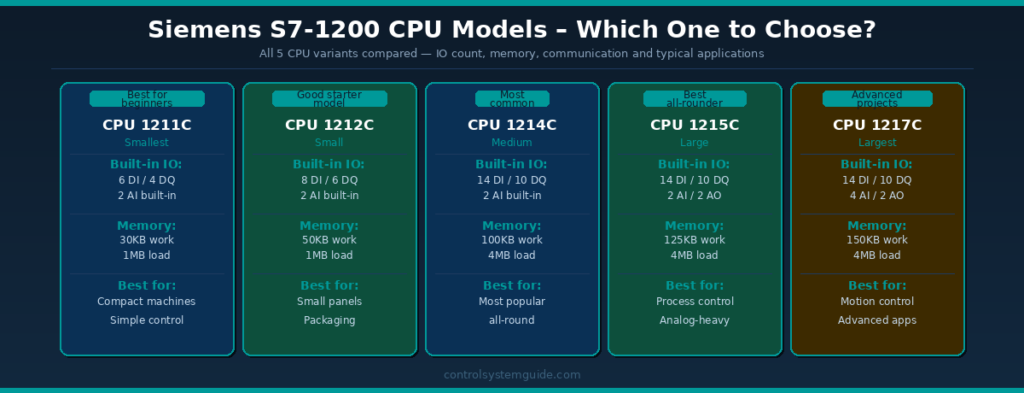
The S7-1200 family includes 5 CPU variants. All share the same programming environment and instruction set — they differ in built-in IO, memory, and expansion capacity:
| CPU Model | Built-in DI | Built-in DQ | Built-in AI | Work Memory | Signal Modules | Best For |
|---|---|---|---|---|---|---|
| CPU 1211C | 6 | 4 | 2 | 30KB | None | Simplest applications, learning |
| CPU 1212C | 8 | 6 | 2 | 50KB | 2 SM | Small standalone machines |
| CPU 1214C | 14 | 10 | 2 | 100KB | 8 SM | Most popular — general purpose |
| CPU 1215C | 14 | 10 | 2 + 2AO | 125KB | 8 SM + PROFINET IO | Process control, analog-heavy |
| CPU 1217C | 14 | 10 | 4 + 2AO | 150KB | 8 SM + high-speed IO | Motion control, advanced apps |
Each CPU is available in 3 power supply variants:
| Variant | Power Supply | Digital Inputs | Digital Outputs | Typical Use |
|---|---|---|---|---|
| DC/DC/DC | 24VDC | 24VDC | 24VDC transistor | Modern control panels, fast switching |
| DC/DC/Relay | 24VDC | 24VDC | Relay contacts | Mixed AC/DC loads, general purpose |
| AC/DC/Relay | 85-264VAC | 24VDC | Relay contacts | Legacy panels, AC power environments |
💡 Recommendation for Beginners: Start with the CPU 1214C DC/DC/DC — it is the most popular S7-1200 model, has enough IO for most learning projects, and the transistor outputs are faster and more reliable than relay outputs for learning purposes.
Siemens S7-1200 Tutorial – TIA Portal Programming Software
TIA Portal (Totally Integrated Automation Portal) is Siemens’ unified engineering environment for programming all SIMATIC PLCs, HMIs, drives, and networks. For S7-1200 programming, you need STEP 7 Basic (included in TIA Portal Basic or higher).
TIA Portal Versions
| Version | Release Year | S7-1200 Support | Notes |
|---|---|---|---|
| TIA Portal V16 | 2020 | ✅ Full support | Stable, widely used |
| TIA Portal V17 | 2021 | ✅ Full support | Added OPC UA improvements |
| TIA Portal V18 | 2022 | ✅ Full support | Current stable version |
| TIA Portal V19 | 2024 | ✅ Full support | Latest version |
How to Download TIA Portal for Free (Trial)
- Go to Siemens TIA Portal Trial
- Create a free Siemens ID account
- Download TIA Portal V19 Trial (21-day full trial)
- Install on Windows 10/11 64-bit (minimum 8GB RAM recommended, 16GB ideal)
- For simulation without hardware: also install PLCSIM — free with TIA Portal
💡 No Hardware? No Problem: Siemens PLCSIM allows you to simulate an S7-1200 completely in software. You can write, test and run programs without any physical PLC hardware — making it the best free learning environment available.
Siemens S7-1200 Tutorial – First Project in TIA Portal Step by Step
Step 1 — Create a New Project
- Open TIA Portal
- Click “Create new project”
- Enter project name: e.g.
My_First_S7_1200_Project - Select save location
- Click “Create”
Step 2 — Add the PLC Hardware
- In the Project tree → click “Add new device”
- Select “Controllers” → “SIMATIC S7-1200”
- Select your CPU model (e.g. CPU 1214C DC/DC/DC)
- Find the exact firmware version that matches your hardware (printed on the CPU front)
- Click “Add” → Device view opens showing your CPU
Step 3 — Configure the IP Address
- In Device view → click on the PROFINET port (green connector on CPU front)
- In Properties panel below → click “Ethernet addresses”
- Set IP address: e.g.
192.168.0.1 - Set Subnet mask:
255.255.255.0 - Your PC must be on the same subnet: e.g.
192.168.0.100
Step 4 — Create a Program Block
- In Project tree → expand your PLC → click “Program blocks”
- Double-click “Main [OB1]” — this opens the main program block
- The ladder logic editor opens with an empty rung
- You are now ready to write your first program
Step 5 — Write a Simple Motor Start/Stop Program
Click on the empty rung and build this simple motor control circuit:
Network 1: Motor Start/Stop with Seal-In
|--[%I0.0]--+--[%I0.2]--[%I0.3/]--(%Q0.0)--|
  START_PB  |    MOTOR_FB    STOP_PB  MOTOR_RUN
            |
            +--[%Q0.0]--+
               MOTOR_RUN (seal-in)
Step 6 — Define PLC Tags
- In Project tree → click “PLC tags” → “Default tag table”
- Add your tags with names and addresses:
| Tag Name | Data Type | Address | Description |
|---|---|---|---|
| START_PB | Bool | %I0.0 | Start push button |
| MOTOR_FB | Bool | %I0.2 | Motor run feedback |
| STOP_PB | Bool | %I0.3 | Stop push button (NC) |
| MOTOR_RUN | Bool | %Q0.0 | Motor contactor output |
Step 7 — Compile and Download
- Click Compile button (wrench icon) — check for 0 errors
- Connect Ethernet cable between PC and S7-1200
- Click Download to device button
- TIA Portal scans for PLCs — select your CPU
- Click Download → Finish
- Put CPU in RUN mode — RUN LED turns green
Siemens S7-1200 Tutorial – IO Addressing Complete Reference
Understanding IO addressing in TIA Portal is essential for writing correct S7-1200 programs. The S7-1200 uses the IEC standard % prefix for all addresses:
Digital IO Addressing
| Address | Type | Description | Example |
|---|---|---|---|
| %I0.0 – %I0.7 | Digital Input | Input byte 0, bits 0-7 | First 8 digital inputs on CPU |
| %I1.0 – %I1.7 | Digital Input | Input byte 1, bits 0-7 | Inputs from first signal module |
| %Q0.0 – %Q0.7 | Digital Output | Output byte 0, bits 0-7 | First 8 digital outputs on CPU |
| %Q1.0 – %Q1.7 | Digital Output | Output byte 1, bits 0-7 | Outputs from first signal module |
| %M0.0 – %M0.7 | Memory Bit | Internal memory bits | Intermediate storage bits |
Analog IO Addressing
| Address | Type | Raw Value Range | Description |
|---|---|---|---|
| %IW64 | Analog Input | 0 – 27,648 | First analog input channel (4-20mA) |
| %IW66 | Analog Input | 0 – 27,648 | Second analog input channel |
| %QW64 | Analog Output | 0 – 27,648 | First analog output channel |
| %IW96 | Analog Input | 0 – 27,648 | First AI on signal module |
💡 Analog Scaling: Raw analog values from 4-20mA inputs range from 5,530 (at 4mA) to 27,648 (at 20mA). Use the NORM_X and SCALE_X function blocks in TIA Portal to convert these raw values to engineering units like °C, bar, or m³/h.
Siemens S7-1200 Tutorial – Timers in TIA Portal
The S7-1200 uses IEC standard timers in TIA Portal. Each timer requires an Instance Data Block (IDB) — a memory block that stores the timer’s preset, elapsed time, and status bits.
| Timer Type | TIA Portal Name | Function | Output Bit |
|---|---|---|---|
| On-Delay | TON | Output ON after input ON for preset time | Q bit |
| Off-Delay | TOF | Output stays ON after input turns OFF | Q bit |
| Retentive | TONR | Accumulates time across multiple input cycles | Q bit |
| Pulse | TP | Fixed-length output pulse on trigger | Q bit |
TON Timer Example in TIA Portal
Preset time format: Use TIME data type — T#5S for 5 seconds, T#500MS for 500 milliseconds, T#2M for 2 minutes.
| Parameter | Connection | Example |
|---|---|---|
| IN (input) | Connect to input condition | %I0.0 (start signal) |
| PT (preset time) | Set the delay time | T#5S (5 seconds) |
| Q (output) | Connect to output or rung contact | “Motor_TON”.Q |
| ET (elapsed time) | Optional — current elapsed time | “Motor_TON”.ET |
For a complete guide to all timer types with 7 real examples: PLC Timer – TON, TOF, RTO and TP Complete Guide
Siemens S7-1200 Tutorial – Counters in TIA Portal
Like timers, S7-1200 counters use Instance Data Blocks in TIA Portal. The three standard IEC counter types are all supported:
| Counter | TIA Portal Name | Counts | Output |
|---|---|---|---|
| Count Up | CTU | Up from 0 to PV | Q = TRUE when CV ≥ PV |
| Count Down | CTD | Down from PV to 0 | Q = TRUE when CV ≤ 0 |
| Up/Down | CTUD | Both up and down | QU when CV≥PV, QD when CV≤0 |
Siemens S7-1200 Tutorial – Communication Protocols
The S7-1200 has a built-in PROFINET port on every CPU — this is the primary communication interface for connecting to TIA Portal, HMIs, remote IO, and other devices.
| Protocol | Type | Common Use | TIA Portal Setup |
|---|---|---|---|
| PROFINET | Industrial Ethernet | Remote IO, HMI, S7 communication | Built-in — configure in Device view |
| Modbus TCP | TCP/IP | SCADA, third-party devices | MB_CLIENT / MB_SERVER function blocks |
| OPC-UA | Unified Architecture | MES, cloud, IIoT platforms | OPC UA server built into CPU firmware |
| Modbus RTU | RS-485 serial | Legacy instruments, drives | Requires CM 1241 communication module |
| PROFIBUS | Serial fieldbus | Legacy field devices | Requires CM 1242-5 module |
| PUT/GET | S7 protocol | S7-to-S7 communication | PUT and GET function blocks |
Siemens S7-1200 vs Allen-Bradley CompactLogix
| Feature | Siemens S7-1200 | Allen-Bradley CompactLogix |
|---|---|---|
| Software | TIA Portal (STEP 7) | Studio 5000 Logix Designer |
| Primary market | Europe, Asia, global | North America |
| IO addressing | %I0.0, %Q0.0, %IW64 | Tag-based (Local:1:I.Data.0) |
| Timer preset format | T#5S (TIME data type) | 5000ms (DINT milliseconds) |
| Network protocol | PROFINET standard | EtherNet/IP standard |
| Simulation | PLCSIM (free with TIA) | Logix Echo (paid) |
| Programming languages | LAD, FUP, SCL, GRAPH | Ladder, FBD, ST, SFC |
| Entry cost | Lower (starter kits available) | Higher entry cost |
Siemens S7-1200 Tutorial – Common Beginner Mistakes
Mistake 1 — Wrong firmware version selected in TIA Portal
When adding the CPU in TIA Portal you must select the exact firmware version that matches your physical hardware — printed on the front of the CPU (e.g. V4.5). Selecting the wrong version prevents downloading to the PLC. Always check the physical hardware firmware version first.
Mistake 2 — PC and PLC on different IP subnets
The most common connection issue. Your PC and S7-1200 must be on the same IP subnet. If the PLC is set to 192.168.0.1, your PC must be in the 192.168.0.x range (e.g. 192.168.0.100). Check Windows network adapter settings if you cannot connect.
Mistake 3 — Using wrong timer preset format
TIA Portal uses the TIME data type for timer presets. The format is T#5S for 5 seconds, T#500MS for 500 milliseconds, T#2M30S for 2 minutes 30 seconds. Typing just a number without T# will cause a compile error.
Mistake 4 — Forgetting to create Instance Data Block for timers/counters
When you place a TON or CTU instruction in TIA Portal, it automatically prompts you to create an Instance Data Block. Always accept this and give it a meaningful name like “Motor_Start_TON”. If you cancel, the instruction will show an error.
Mistake 5 — Not compiling before downloading
Always compile (Ctrl+B) before downloading to the PLC. TIA Portal will warn you if there are errors, but some warnings are easy to miss. A successful compile with 0 errors and 0 warnings confirms the program is ready to download.
Mistake 6 — Confusing optimized and non-optimized data blocks
S7-1200 data blocks are optimized by default — tags have no fixed memory offset and cannot be accessed by absolute address. If you need to access data by absolute address (for Modbus communication), you must uncheck “Optimized block access” in the block properties.
Frequently Asked Questions – Siemens S7-1200
What is the Siemens S7-1200 used for?
The Siemens S7-1200 is used for small to medium-scale industrial automation applications. Common uses include conveyor control, packaging machines, pump and motor control, water treatment systems, building automation, and any application requiring up to 284 IO points. It is the most widely used compact PLC in Europe and one of the most popular worldwide.
What software do I need to program the Siemens S7-1200?
The Siemens S7-1200 is programmed using TIA Portal (Totally Integrated Automation Portal). Specifically, you need STEP 7 Basic or higher, which is included in TIA Portal Basic, Professional, or Advanced editions. A 21-day free trial is available from the Siemens website. For simulation without hardware, also install SIMATIC PLCSIM which is included free with TIA Portal.
What is the difference between S7-1200 and S7-1500?
The S7-1200 is a compact PLC for small to medium applications with up to 284 IO points and 150KB work memory. The S7-1500 is a more powerful modular PLC for complex machines and process control with unlimited IO expansion, faster processing, and advanced motion control capabilities. The S7-1500 is also significantly more expensive. For most beginners and small-to-medium projects, the S7-1200 is the right choice.
How do I connect to the Siemens S7-1200 from TIA Portal?
Connect an Ethernet cable directly between your PC’s network port and the S7-1200’s PROFINET port. Set your PC’s IP address to the same subnet as the PLC (for example if the PLC is 192.168.0.1, set your PC to 192.168.0.100). In TIA Portal, click the Download button, select “Show all compatible devices”, and TIA Portal will scan and find your PLC. Select it and click Download.
Can I program the S7-1200 without hardware using a simulator?
Yes. Siemens PLCSIM allows you to simulate an S7-1200 completely in software without any physical hardware. PLCSIM is included free with TIA Portal and supports most S7-1200 instructions including timers, counters, and communication. This makes it the best free learning environment for beginners starting with Siemens PLC programming.
What programming languages does the S7-1200 support?
The S7-1200 supports four IEC 61131-3 programming languages in TIA Portal: LAD (Ladder Diagram) — the most commonly used, FUP (Function Block Diagram) — Siemens name for FBD, SCL (Structured Control Language) — Siemens name for Structured Text, and GRAPH — Siemens name for Sequential Function Chart. Each program block can use a different language within the same project.
What is an Instance Data Block in TIA Portal?
An Instance Data Block (IDB) is a memory block automatically created when you use a function block instruction like a timer (TON) or counter (CTU) in TIA Portal. It stores all the parameters and status data for that specific instruction instance — the preset value, elapsed time, current value, and output bits. You must assign a unique IDB to each timer and counter in your program. TIA Portal prompts you automatically when you place these instructions.
How is IO addressed in the Siemens S7-1200?
The S7-1200 uses the IEC standard % prefix for IO addressing. Digital inputs use %I0.0 through %I0.7 for the first 8 channels, %I1.0 onward for additional modules. Digital outputs use %Q0.0 onward. Analog inputs use word addresses starting at %IW64. Analog outputs use %QW64 onward. In TIA Portal it is best practice to use symbolic tag names (like “Motor_Run”) instead of absolute addresses, as the software maps these automatically.
Conclusion
This Siemens S7-1200 tutorial has covered everything a beginner needs. The S7-1200 is an excellent PLC for beginners. Its combination of powerful features, integrated PROFINET communication, and seamless TIA Portal integration makes it the standard compact PLC for automation projects across Europe and globally.
Key points to remember from this Siemens S7-1200 tutorial:
- The CPU 1214C DC/DC/DC is the most popular and best starting model for most applications
- TIA Portal is the programming environment — download the free trial with PLCSIM for simulation
- %I, %Q, %IW, %QW addressing with symbolic tag names is the correct approach
- Timers and counters use Instance Data Blocks — TIA Portal creates these automatically
- Timer presets use the TIME data type — T#5S, T#500MS format
Related Guides:
- PLC Programming Languages – LAD, FUP, SCL, GRAPH Explained
- PLC Timer – TON, TOF, TONR and TP Complete Guide
- PLC Inputs and Outputs – DI, DO, AI, AO Complete Guide
- PLC Ladder Logic Tutorial – 7 Real Industrial Examples

Automation engineer based in Asia, with hands-on experience in PLC programming, SCADA, and industrial control systems across oil and gas, power, food and beverage, and water industries. Writes about PLC fundamentals, ladder logic, vendor-specific instruction sets for Siemens, Allen-Bradley, and other major platforms, and industrial communication protocols.