Last Updated: April 2026 | Written for complete beginners, career changers, and technicians entering industrial automation.
To learn PLC programming is one of the best career decisions you can make in 2026. PLC programmers are in high demand across every manufacturing industry — automotive, food and beverage, pharmaceutical, water treatment, oil and gas — and the skills are accessible to anyone with basic electrical knowledge and the right approach.
The good news is you can learn PLC programming completely free using simulation software — no expensive hardware, no costly courses, and no degree required. This guide gives you the exact roadmap used by thousands of engineers and technicians who successfully learned PLC programming from scratch.
In this guide you will find:
- A proven 5-step roadmap to learn PLC programming from zero to job-ready
- The best free software to learn PLC programming without hardware
- Which platform to choose — Siemens or Allen-Bradley
- A week-by-week plan for the first 90 days
- Real PLC programmer salary data for 2026
- The skills employers look for in new PLC programmers
- Common mistakes beginners make when they learn PLC programming
⚡ Want to Fast-Track Your PLC Learning?
If you prefer structured video lessons over self-study, the highly-rated PLC Programming from Scratch course on Udemy teaches you ladder logic, RSLogix 500, and FactoryTalk View through hands-on exercises — used by 50,000+ engineering students worldwide. It’s a great companion to this free guide.
Disclosure: This is an affiliate link. We may earn a small commission at no extra cost to you, which helps support this free educational content.
Why Learn PLC Programming in 2026?
The demand for engineers who know how to learn PLC programming and apply those skills in real industrial environments has never been higher. As manufacturing industries worldwide accelerate automation, the need for PLC programmers is growing faster than the supply of qualified professionals.
According to the US Bureau of Labor Statistics, industrial automation roles are projected to grow 12-15% through 2032 — significantly faster than average occupations. On any given day there are 15,000-20,000 open PLC programming positions in the United States alone.
| Experience Level | Typical Salary (US) | Typical Salary (UK) | Typical Salary (EU) |
|---|---|---|---|
| Entry level (0-2 years) | $55,000 – $70,000 | £28,000 – £38,000 | €32,000 – €45,000 |
| Mid-level (3-6 years) | $70,000 – $95,000 | £38,000 – £55,000 | €45,000 – €65,000 |
| Senior (7+ years) | $95,000 – $130,000+ | £55,000 – £80,000+ | €65,000 – €95,000+ |
| Specialist / Contractor | $130,000 – $180,000+ | £80,000 – £120,000+ | €95,000 – €140,000+ |
How to Learn PLC Programming – The 5-Step Roadmap
The most effective way to learn PLC programming is to follow a structured sequence — building knowledge layer by layer rather than jumping straight into complex programs. Here is the proven 5-step roadmap that beginners use to learn PLC programming successfully:
| Step | Timeline | Focus | Goal |
|---|---|---|---|
| Step 1 | Weeks 1-2 | PLC fundamentals and electrical basics | Understand what a PLC is and how it works |
| Step 2 | Weeks 3-4 | Learn PLC programming with ladder logic | Write simple start/stop and timer programs |
| Step 3 | Weeks 5-8 | Choose a platform and practice daily | Complete real programs in TIA Portal or Studio 5000 |
| Step 4 | Month 3 | Build real project portfolio | Complete 3-5 documented practice projects |
| Step 5 | Month 4+ | Apply for automation roles | Land your first PLC programming job |
Step 1 – Learn PLC Programming Fundamentals First (Weeks 1-2)
Before you write a single line of code, spend two weeks building your foundation. Every engineer who successfully learns PLC programming quickly will tell you the same thing — understanding the fundamentals first makes everything else much easier.
What to Cover in Step 1
| Topic | What to Learn | Guide on This Site |
|---|---|---|
| What is a PLC | Components, history, scan cycle, how PLCs replaced relay panels | What Is a PLC? Complete Guide |
| PLC Scan Cycle | Input image table, program execution, output scan, scan time | PLC Scan Cycle Explained |
| PLC Inputs and Outputs | DI, DO, AI, AO — field devices, signal types, wiring basics | PLC Inputs and Outputs Guide |
| 4-20mA Signal | Analog signals, live zero, wiring, scaling | 4-20mA Signal Explained |
| Industrial systems overview | PLC vs DCS vs SCADA — the control system landscape | PLC vs DCS vs SCADA Guide |
💡 Step 1 Goal: By the end of week 2 you should be able to explain what a PLC is, describe the scan cycle in your own words, and explain the difference between digital and analog signals. You do not need to write any code yet — understanding comes before coding when you learn PLC programming.
Step 2 – Learn PLC Programming with Ladder Logic (Weeks 3-4)
Ladder Logic (LAD) is the most widely used PLC programming language in the world and the best language to learn PLC programming for beginners. It is visual, intuitive, and directly maps to the electrical relay diagrams that PLC systems replaced. Most employers expect new engineers to learn PLC programming starting with Ladder Logic before moving to other languages.
Ladder Logic Topics to Master
| Week | Topic | Key Instructions |
|---|---|---|
| Week 3 | Basic contacts and coils | NO contact, NC contact, Output coil, Set/Reset coil |
| Week 3 | Motor control circuits | Start/Stop circuit, Seal-in contact, Interlock logic |
| Week 4 | Timers | TON (On-delay), TOF (Off-delay), TONR (Retentive) |
| Week 4 | Counters | CTU (Count Up), CTD (Count Down), Reset |
| Week 4 | Comparison instructions | EQU, NEQ, GRT, LES, GEQ, LEQ |
For the complete guide: PLC Ladder Logic Tutorial – 7 Real Industrial Examples
Step 3 – Choose Your Platform to Learn PLC Programming (Weeks 5-8)
This is where most beginners make their biggest mistake — trying to learn PLC programming on multiple brands at once. Pick one platform and focus on it completely. The fundamentals transfer easily between brands once you know one well.
Which Platform Should You Choose to Learn PLC Programming?
| Platform | Choose If… | Market | Free Software |
|---|---|---|---|
| Siemens TIA Portal | You are in Europe, Middle East, Asia or want global career options | Europe, Asia, Global | TIA Portal Trial + PLCSIM |
| Allen-Bradley Studio 5000 | You are in North America or targeting automotive / food industries | North America dominant | RSLogix 500 (free version) |
| Codesys | You want platform-neutral skills that transfer to many brands | Global — many brands use it | 100% free forever |
💡 Our Recommendation: If you are unsure which platform to learn PLC programming on — start with Siemens TIA Portal and PLCSIM. The Siemens S7-1200 is the most widely deployed compact PLC globally, and PLCSIM provides completely free simulation. Read our complete Siemens S7-1200 Tutorial to get started.
Best Free Software to Learn PLC Programming Without Hardware
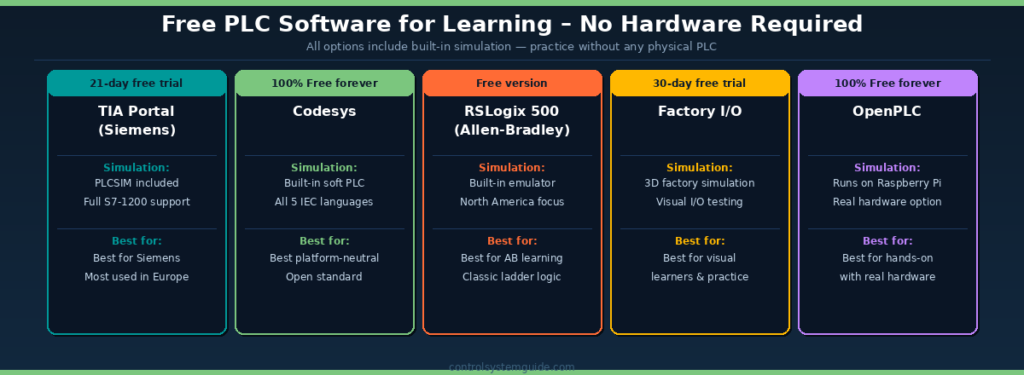
The best news for anyone who wants to learn PLC programming today is that you do not need to buy expensive hardware. All the software below lets you learn PLC programming completely free using built-in simulation on your PC.
| Software | Cost | Simulation | Languages | Best For |
|---|---|---|---|---|
| TIA Portal (Siemens) | 21-day free trial | ✅ PLCSIM included | LAD, FUP, SCL, GRAPH | Learn PLC programming on Siemens S7-1200 |
| Codesys | 100% free forever | ✅ Built-in soft PLC | All 5 IEC 61131-3 languages | Platform-neutral — learn PLC programming for any brand |
| RSLogix 500 | Free version available | ✅ RSLogix Emulate | Ladder Logic | Learn PLC programming on Allen-Bradley classic |
| Factory I/O | 30-day free trial | ✅ 3D factory simulation | Works with any PLC software | Visual practice — see your programs control real factory scenes |
| OpenPLC | 100% free forever | ✅ Runs on PC or Pi | LAD, FBD, ST, SFC | Learn PLC programming with real low-cost hardware |
How to Install TIA Portal Free
- Go to the Siemens Industry website and create a free Siemens ID account
- Download TIA Portal V19 Trial (21-day full access to learn PLC programming)
- Also download PLCSIM — the S7-1200 simulator free with TIA Portal
- Install on Windows 10/11 64-bit — minimum 8GB RAM (16GB recommended)
- After the 21-day trial expires renew the trial or switch to Codesys to continue practice
Week-by-Week Plan to Learn PLC Programming in 90 Days
Use this structured week-by-week plan to learn PLC programming in a systematic way. Each week builds directly on the previous one — skip no steps.
| Week | Focus Area | Daily Time | Goal by End of Week |
|---|---|---|---|
| 1 | PLC fundamentals — what is a PLC, scan cycle, IO types | 30-45 min reading | Explain scan cycle and IO types in own words |
| 2 | Electrical basics — sensors, switches, actuators, wiring | 30-45 min reading | Understand DI/DO/AI/AO and when each is used |
| 3 | Learn PLC programming — ladder logic contacts and coils | 1 hour in software | Build working start/stop motor circuit in simulator |
| 4 | Timers and counters — TON, TOF, CTU, CTD | 1 hour in software | Conveyor with timer delay and product counter working |
| 5 | Choose platform — install software, first project | 1-2 hours setup | First downloaded program running in PLCSIM or Codesys |
| 6 | IO addressing and tag creation | 1 hour practice | Complete IO tag table for a simple machine |
| 7 | Analog scaling — learn PLC programming with 4-20mA signals | 1-2 hours practice | Scale temperature input from raw value to degrees C |
| 8 | Complete a full machine program | 2-3 hours project | Working conveyor, fill and reject system program |
| 9-10 | Learn PLC programming — HMI basics and communication | 1-2 hours daily | Simple HMI screen connected to PLC program |
| 11-12 | Portfolio projects — build and document 3 programs | 2-3 hours daily | 3 complete documented portfolio projects ready |
Skills Employers Look For When You Learn PLC Programming
Knowing which skills to prioritize helps you learn PLC programming more efficiently. Focus your time on what employers actually test for in interviews.
| Skill | Employer Priority | How to Develop |
|---|---|---|
| Ladder Logic programming | ⭐⭐⭐⭐⭐ Essential | Daily practice in free simulator — 1 hour per day |
| PLC IO wiring knowledge | ⭐⭐⭐⭐⭐ Essential | Study IO types and practice IO list creation |
| Fault finding and troubleshooting | ⭐⭐⭐⭐⭐ Essential | Deliberately introduce faults into your practice programs |
| Reading electrical schematics | ⭐⭐⭐⭐ Important | Study basic electrical drawing symbols — many free resources online |
| HMI programming basics | ⭐⭐⭐⭐ Important | Practice WinCC Unified (Siemens) or FactoryTalk (Allen-Bradley) |
| Structured Text (SCL/ST) | ⭐⭐⭐ Valuable | Learn after you have mastered Ladder Logic — same logic, text format |
| PROFINET or EtherNet/IP | ⭐⭐⭐ Valuable | Study network configuration in your chosen PLC software |
| PID control loops | ⭐⭐⭐ Valuable | Practice PID tuning in simulator — understand P, I, D parameters |
Common Mistakes Beginners Make When They Learn PLC Programming
Mistake 1 — Trying to learn PLC programming on multiple brands at once
Many beginners attempt to learn PLC programming on Siemens and Allen-Bradley simultaneously. This is counterproductive — the concepts are identical but the software, addressing, and workflow are different enough to cause serious confusion. Pick one platform, master it completely, then add a second. Most employers use one brand primarily anyway.
Mistake 2 — Only watching videos without actually programming
Watching tutorials about how to learn PLC programming without opening the software is the single biggest learning mistake. You will forget 80% of what you watched within a week if you do not practice. Install the free software on day 1 and start writing programs from day 3 — even simple ones with just 2 rungs.
Mistake 3 — Skipping electrical fundamentals
PLC programming is applied to electrical control systems. Without understanding basic electricity — voltage, current, NO/NC contacts, relay logic — the programming will feel abstract. Spend 1-2 weeks on electrical basics before writing your first program. This investment pays back immediately when you start working on real projects.
Mistake 4 — Not building a portfolio while you learn PLC programming
When applying for your first automation job, employers want evidence of what you can do. Build 3-5 documented projects in your simulator and be ready to explain what each one does, how it works, and what problems it solves. A portfolio of working programs is far more valuable than any course certificate alone.
Mistake 5 — Waiting until you feel completely ready to apply for jobs
Many people who learn PLC programming delay applying for jobs until they feel fully confident. In reality most junior automation roles expect you to continue learning on the job — employers hire for attitude and basic skills, then train the rest. Apply after 3-4 months of consistent learning even if you do not feel fully ready.
Free Resources to Learn PLC Programming Online
| Resource | Type | Cost | Best For |
|---|---|---|---|
| Control System Guide | Written guides with real examples | Free | Structured path to learn PLC programming — Siemens and AB dual format |
| PLC Academy | Written tutorials | Free | Beginner ladder logic, SCADA, structured text |
| SolisPLC | Written tutorials and video | Free basic / paid courses | Allen-Bradley focused — learn PLC programming with Rockwell |
| RealPars | Video courses | Free trial / subscription | Visual learners — broad automation topics |
| Siemens Industry Support | Official documentation and examples | Free | S7-1200 manuals — learn PLC programming the official way |
| Reddit r/PLC | Community forum | Free | Real engineer advice when you get stuck |
| YouTube — Siemens official | Video tutorials | Free | TIA Portal specific step-by-step programming guides |
Complete Learning Path on This Site
Every guide on this site is designed as a structured sequence to help you learn PLC programming step by step. Read them in this order for the best results:
- What Is a PLC? — Start here before everything else
- PLC Scan Cycle — How PLCs execute programs
- PLC Inputs and Outputs — DI, DO, AI, AO signals explained
- PLC Programming Languages — All 5 IEC 61131-3 languages
- Ladder Logic Tutorial — 7 real industrial examples
- PLC Timers — TON, TOF, TONR, TP explained
- PLC Counters — CTU, CTD, CTUD explained
- Siemens S7-1200 Tutorial — Platform-specific complete guide
- PLC Troubleshooting Guide — Fault finding methodology
Frequently Asked Questions – Learn PLC Programming
How long does it take to learn PLC programming?
With consistent daily practice of 1-2 hours most beginners can write basic PLC programs within 3-4 weeks and be job-ready within 3-4 months. The fundamentals of ladder logic can be grasped in 2 weeks. To learn PLC programming to a professional level typically takes 6-12 months of real-world experience after your first job. The learning curve is steep at first but flattens quickly once the core concepts click into place.
Do I need hardware to learn PLC programming?
No. You can learn PLC programming completely free using simulation software. Siemens TIA Portal includes PLCSIM, Codesys runs a complete soft PLC on any Windows PC, and Factory I/O provides 3D factory simulations. You can complete months of learning entirely in free software. Physical hardware is helpful for understanding wiring but is not required to learn PLC programming effectively.
Which PLC brand should I choose to learn PLC programming?
If you are in Europe, Middle East or Asia — start with Siemens S7-1200 and TIA Portal. If you are in North America — Allen-Bradley Studio 5000 dominates the market. If you are unsure, Siemens TIA Portal with PLCSIM is the best starting point because it has the largest global installed base, excellent free simulation, and a comprehensive beginner tutorial on this site.
Is it hard to learn PLC programming?
Ladder Logic — the most common PLC programming language — was specifically designed for electricians and engineers without software backgrounds. Most beginners can write their first working program within 1-2 weeks of starting to learn PLC programming. Advanced topics like structured text and motion control are harder, but the fundamentals are very accessible to anyone with basic electrical knowledge.
What salary can I expect after I learn PLC programming?
Entry-level PLC programmers in the US typically earn $55,000 to $70,000 per year. With 3-6 years of experience salaries reach $70,000 to $95,000. Senior programmers with 7 or more years earn $95,000 to $130,000 or more. Specialists with motion control or safety expertise earn $130,000 to $180,000 or more. Salaries vary by location, industry, and specific platform expertise.
What is the best free software to learn PLC programming?
For Siemens: TIA Portal Trial with PLCSIM is the best option — the real production software with a free 21-day trial including a complete S7-1200 simulator. For platform-neutral learning: Codesys is completely free forever with a built-in soft PLC and all 5 IEC 61131-3 languages. For visual practice: Factory I/O provides 3D factory simulations that connect to any PLC software with a 30-day free trial.
What jobs can I get after I learn PLC programming?
After you learn PLC programming you can apply for roles including PLC Programmer, Automation Engineer, Controls Engineer, Machine Builder, Commissioning Engineer, Systems Integrator, and Automation Technician. These roles exist in virtually every manufacturing industry. Many experienced PLC programmers move into project management, sales engineering, or automation consulting roles as their careers progress.
Do I need a degree to learn PLC programming professionally?
No. A degree is not required to work as a PLC programmer. Many successful automation engineers come from electrical apprenticeship backgrounds or are entirely self-taught. Employers prioritize practical skills — working knowledge of PLC software, troubleshooting ability, and electrical understanding — over formal qualifications. A portfolio of working practice projects demonstrates your ability to learn PLC programming far more effectively than any certificate alone.
Conclusion – Start Today
The best time to learn PLC programming is right now. The demand for PLC skills is high, the free resources to learn PLC programming are better than ever, and you can go from complete beginner to job-ready in 3-4 months with consistent daily practice.
Follow this path to learn PLC programming step by step:
- Weeks 1-2: Learn PLC programming fundamentals — scan cycle, IO types, electrical basics
- Weeks 3-4: Learn PLC programming with ladder logic — contacts, coils, timers, counters
- Weeks 5-8: Choose Siemens or Allen-Bradley — install free software and practice daily
- Month 3: Build 3-5 portfolio projects in simulator — document every one
- Month 4+: Apply for entry-level automation roles — you are ready
Begin your journey to learn PLC programming today — start with: What Is a PLC? Complete Beginner’s Guide

Automation engineer based in Asia, with hands-on experience in PLC programming, SCADA, and industrial control systems across oil and gas, power, food and beverage, and water industries. Writes about PLC fundamentals, ladder logic, vendor-specific instruction sets for Siemens, Allen-Bradley, and other major platforms, and industrial communication protocols.