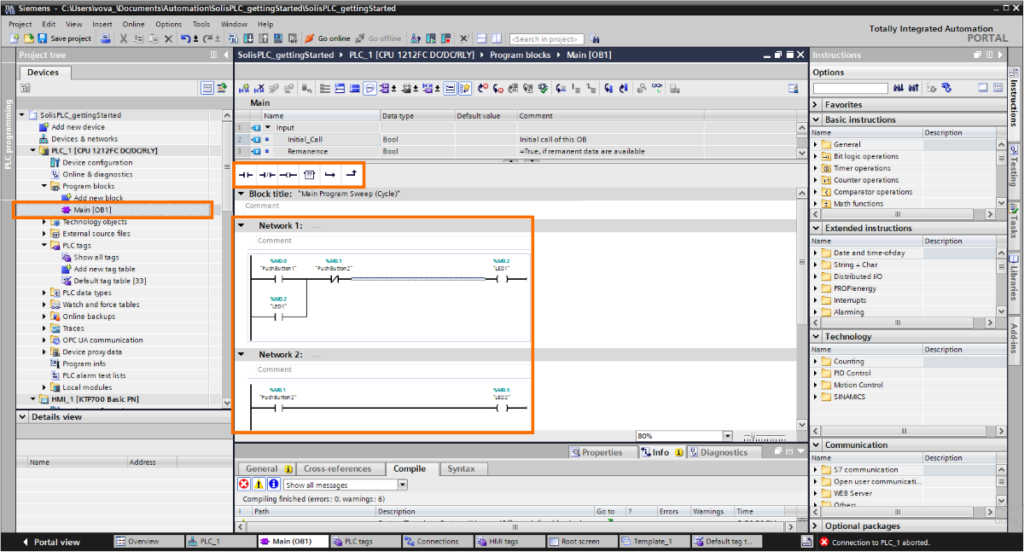
PLC software is an essential part of industrial automation, allowing engineers and technicians to program, configure, and troubleshoot PLC systems. For beginners, choosing the right PLC software can make learning PLC programming much easier and more effective.
There are both free and paid PLC software options available today, each with its own advantages. In this guide, we will explore the best PLC software for beginners, including free tools, paid platforms, and simulators that help build practical skills in industrial automation.
What Is PLC Software?
PLC software is used to create, edit, test, and monitor control programs that run on programmable logic controllers. It allows users to write logic, configure hardware, and communicate with PLC devices in industrial automation systems.
Most PLC software provides tools for ladder logic, function block diagrams, structured text, and system diagnostics. Without PLC software, it would not be possible to program or maintain modern automation systems.
Why Beginners Need the Right PLC Software
For beginners, the choice of PLC software plays a major role in how quickly and effectively PLC programming skills are developed. Software that is difficult to install or understand can slow down the learning process and cause unnecessary frustration.
Beginner-friendly PLC software often includes clear interfaces, built-in examples, simulation tools, and good documentation. Using the right software helps beginners focus on learning PLC concepts rather than struggling with complex setup or configuration issues.
Free PLC Software for Beginners
Several PLC manufacturers provide free software versions that are suitable for beginners. These tools allow new learners to understand PLC programming concepts without the need for an initial investment.
Free PLC software is often limited in terms of features, supported hardware, or project size, but it is still very useful for learning basic programming logic, I/O handling, and troubleshooting techniques. For beginners, these tools provide a practical starting point to gain hands-on experience.
Many free PLC software packages also include tutorials, example projects, and simulation capabilities, which help beginners practice PLC programming without access to physical hardware.
Paid PLC Software Worth Learning
Paid PLC software typically offers more advanced features compared to free versions. These tools are designed for professional use and support a wider range of PLC hardware, communication protocols, and system configurations.
For beginners who plan to work in industrial environments, learning paid PLC software can be beneficial because it reflects what is commonly used in real-world projects. Paid software often includes better debugging tools, detailed diagnostics, and stronger integration with industrial networks.
Although paid PLC software requires a financial investment, it provides long-term value by preparing learners for professional automation roles and complex industrial applications.
PLC Simulator Software for Practice
PLC simulator software allows beginners to practice PLC programming without the need for physical hardware. These tools simulate PLC behavior, PLC inputs and outputs, making them ideal for learning logic, testing programs, and understanding system responses.
Simulator software is especially useful for beginners who do not yet have access to industrial PLC equipment. It enables hands-on learning in a safe and cost-effective environment, helping users build confidence before working on real systems.
Many PLC simulators support common programming languages and include visualization features that make it easier to understand how PLC programs interact with inputs and outputs.
Free vs Paid PLC Software: Key Differences
The main difference between free and paid PLC software lies in their capabilities and intended use. Free PLC software is generally designed for learning, testing, and basic applications, while paid software is built for professional and industrial environments.
Free software may have limitations such as restricted project size, limited hardware support, or fewer diagnostic tools. Paid PLC software typically offers advanced programming features, better performance, and full compatibility with industrial PLC systems.
For beginners, free software is often sufficient for learning core PLC concepts, while paid software becomes more relevant as experience grows and real-world projects become more complex.
How to Choose PLC Software as a Beginner
When choosing PLC software as a beginner, it is important to consider learning goals, available resources, and future career plans. Beginners should start with software that is easy to install, well-documented, and supported by tutorials or examples.
Compatibility with simulation tools is another important factor, as it allows beginners to practice without physical hardware. As skills improve, transitioning to more advanced software used in industrial projects becomes easier.
Selecting PLC software that balances simplicity and real-world relevance helps beginners build a strong foundation in industrial automation.
Final Recommendation for Beginners
For beginners, the best approach is to start with free PLC software or simulator tools to learn the basics of PLC programming and system behavior. These tools provide a low-risk environment to build confidence and practical skills.
As experience increases, learning paid PLC software used in industrial environments becomes valuable for professional growth. Combining free learning tools with exposure to professional software creates a balanced and effective learning path for beginners in industrial automation.